 PSXfolio
Everything PSXfolio does
No roadmap items, no “coming soon” asterisks — every feature on this page ships in the app today. It’s a long page, because it’s a deep app.
portfolio & P&L
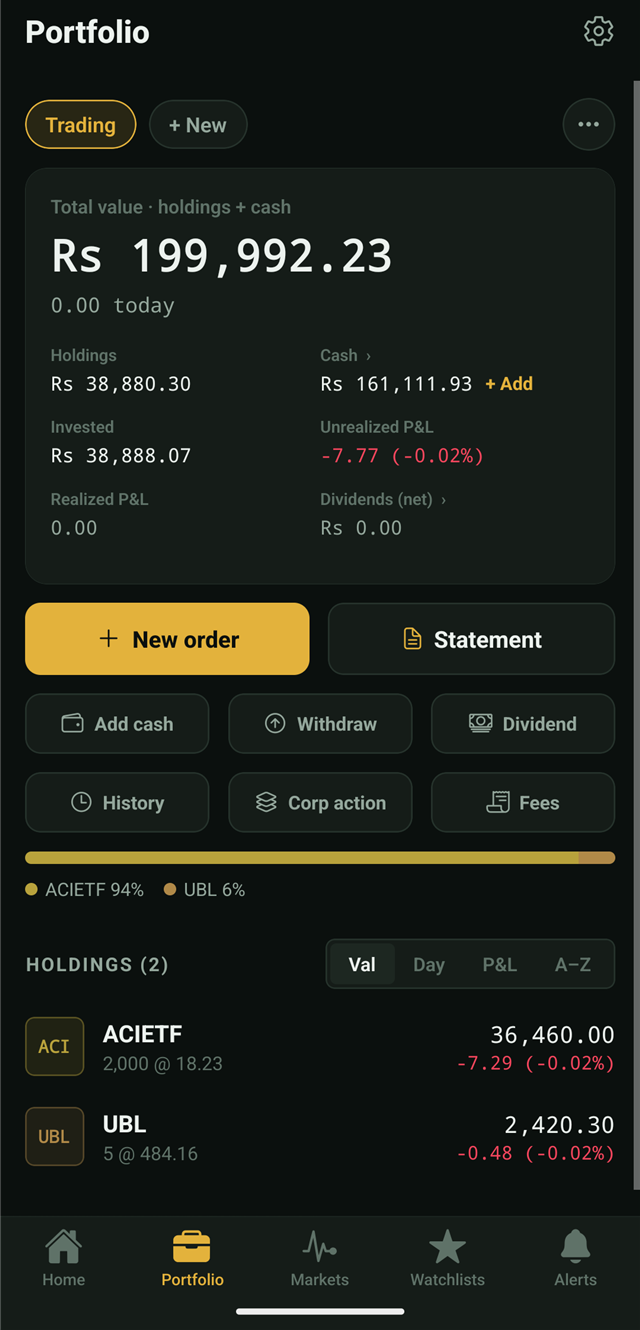
A real position ledger
The core of PSXfolio is an accounting engine, not a quote list with a total slapped on top.
- Multiple portfolios
- Keep trading and long-term books apart — or one per family member. Each has its own fees, cash setting and history; the Home tab rolls them up.
- Weighted-average cost
- Every buy recomputes your average cost with brokerage fees capitalized, the way your CDC statement would.
- Realized & unrealized P&L
- Selling books realized P&L against your average cost; open positions show unrealized P&L and day change, live.
- Holdings, sorted your way
- Sort positions by value, day move, total P&L or alphabetically. Allocation bars show your book by stock and by portfolio.
Entry that matches how you actually trade
- Backdated orders
- Record a buy or sell on any past date — rebuild years of history and the math replays correctly, in order.
- Fee presets per portfolio
- Fixed, percentage, or fixed-below-a-threshold-then-percent — configured separately for buys and sells. Every order prefills from the preset and stays editable.
- Optional cash tracking
- Turn it on and the portfolio keeps a cash ledger: deposits, withdrawals, order settlements and dividend credits, with a full statement view. Leave it off for pure position tracking.
- Helpful errors
- Buying more than your cash covers? The error offers to deposit exactly the shortfall — one tap, carry on.
- CSV import & export
- Bring order history in from a spreadsheet, and export it back out any time. Your records are never locked in.
- Full history
- Every order, dividend and corporate action in one chronological list per portfolio.
Dividend tracking with the tax already done
- Net-of-tax recording
- Enter the announced rate (Rs per share); shares prefill from your holding and withholding tax is deducted at your rate. The summary shows net dividends received.
- Dividend calendar
- Projected annual income — gross, net and yield on cost — plus upcoming ex-dates for your holdings with your payout amounts, and a received history.
- Ex-date reminders
- When an announced payout goes ex while you hold the stock, the Home tab surfaces it — record it in one tap.
- Cash integration
- With cash tracking on, net dividends credit the portfolio’s cash balance automatically.
corporate actions
Bonus, rights and splits — done properly
Corporate actions are where DIY spreadsheets fall apart. PSXfolio replays them chronologically through your cost basis and shows a before/after preview before anything is saved.
- Bonus shares
- Share count rises, average cost falls — automatically consistent with your order history.
- Rights subscriptions
- Record the subscription price and quantity; cost basis and (optionally) cash update together.
- Splits
- Ratio applied to quantity and cost with nothing lost in rounding.
- Picked from your holdings
- The action flow starts from what you own — no hunting through the whole market.
replayed chronologically
12 Mar · FFC bonus 20%100 → 120 sharesavg 33.90 → 28.25
02 Apr · LUCK rights @ 380+25 sharescash −9,500
19 May · MEBL div 7.00× 200 · WHT 15%+1,190 net
28 May · SYS split 1:1050 → 500 sharesavg ÷ 10
Beat the index, or know that you didn’t
- Time-weighted return (TWR)
- Deposits and withdrawals are neutralized, so the chart measures your decisions — not your paycheque schedule.
- You vs KSE-100
- Your TWR and the index plotted from a common zero over the selected window, with window alpha stated plainly.
- Annualized XIRR
- The money-weighted answer to “what rate did my rupees actually earn?” — cash-flow aware, annualized.
- Value & Return modes
- Flip the performance card between your portfolio’s value curve and its return comparison.
markets & charts
The market at a glance, the chart in depth
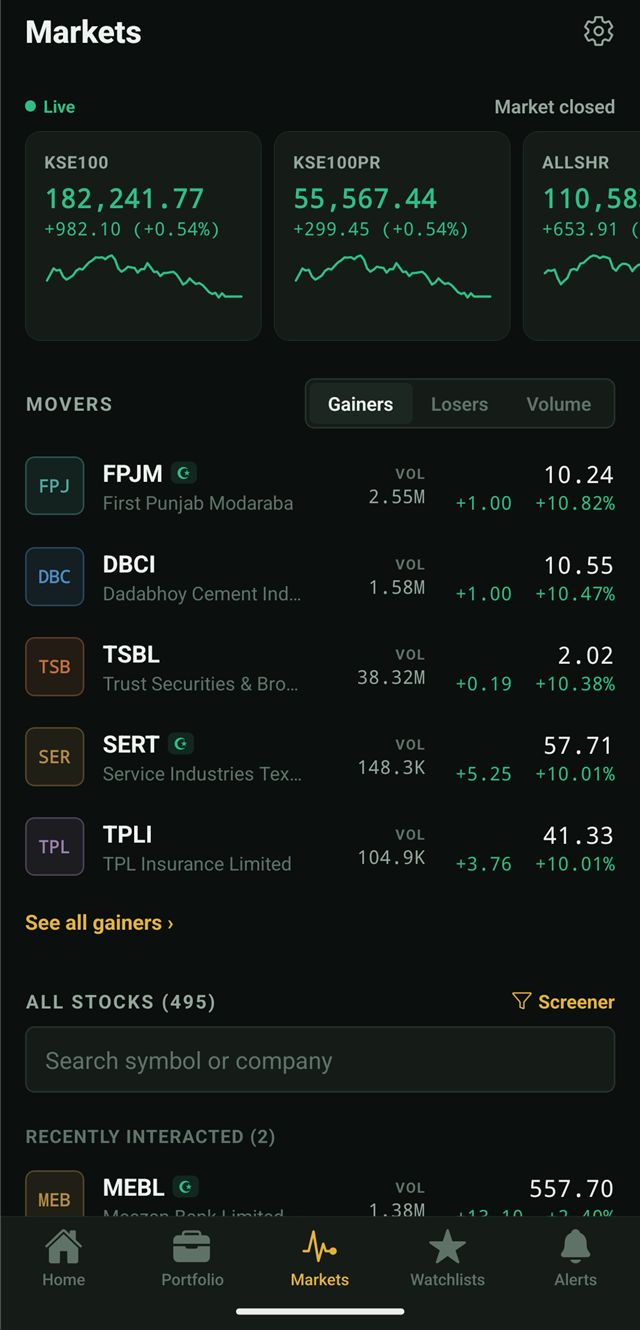
- Live index cards
- KSE-100 and the major PSX indices with sparklines and day change.
- Movers
- Top gainers, losers and volume leaders, refreshed with the feed.
- A stock list that knows you
- 500+ symbols, searchable, sectioned into recently interacted, holdings, watchlisted, and everything else.
- Terminal-grade charts
- Candles or line across 1m/5m/15m/1h/1d; MA, EMA, Bollinger overlays; volume, RSI and MACD panes; long-press crosshair. Simple by default — indicators stay collapsed until you want them.
- Fundamentals grid
- P/E, dividend yield, P/B, market cap and 52-week range on every symbol page.
screener
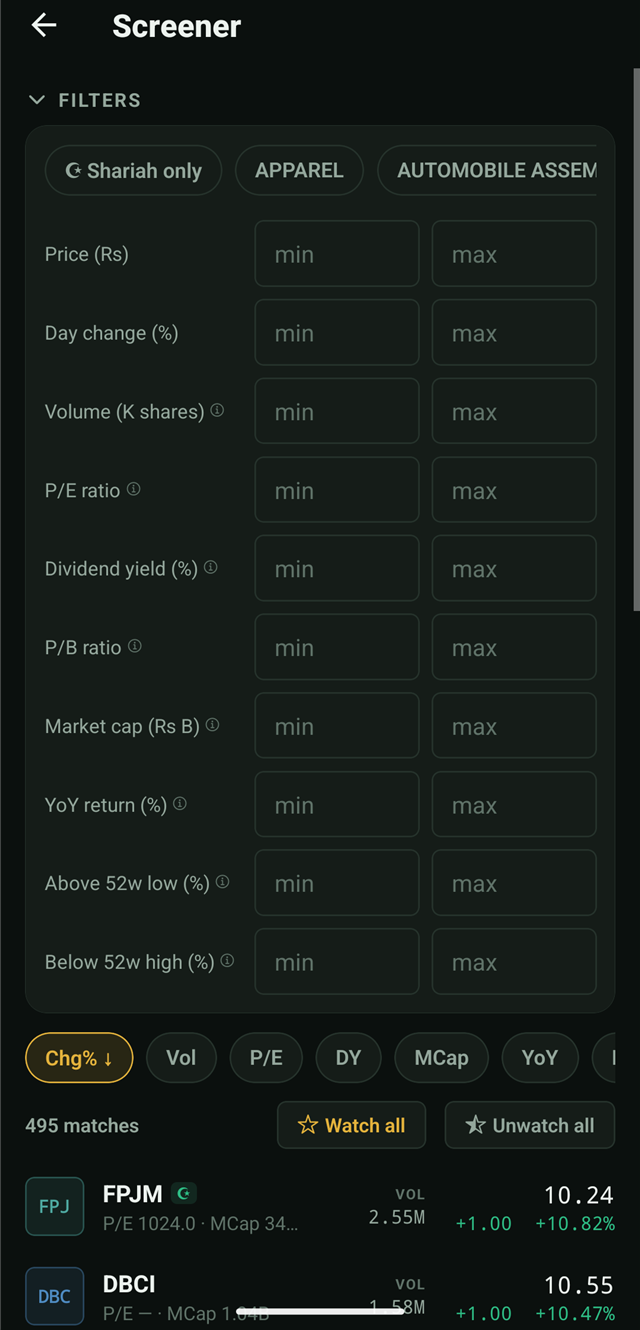
Ten filters. The whole exchange.
Every metric is computed live from the feed’s fundamentals — screen by any combination, sort by any column:
- Sector · price · day change % · volume
- P/E ratio · dividend yield · P/B ratio · market cap
- YoY return · distance above the 52-week low · distance below the 52-week high
- Shariah-only toggle using the KMI screen
- Watch all / Unwatch all — pipe an entire result set into a watchlist in one tap
smart watchlists
Lists that maintain themselves
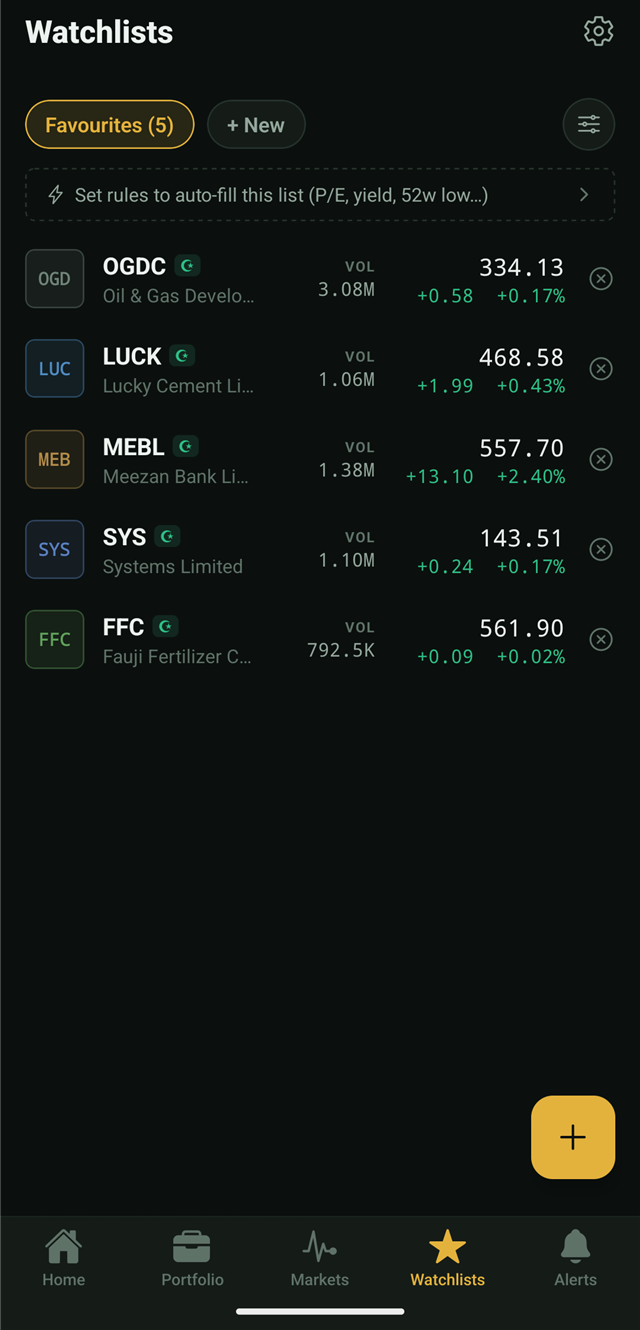
- As many lists as you want
- Create, rename, reorder; add from anywhere — a stock page, the screener, or the list itself.
- Rules, not chores
- Attach criteria — “P/E ≤ 5”, “YoY ≥ 10%”, “within 25% of the 52-week low”, a sector, Shariah-only — and membership recomputes live on every price update.
- Match preview
- See exactly which stocks qualify while you’re still editing the rules.
- Enter/exit alerts
- Optional per list: get notified when a stock joins or leaves, with a 30-minute cooldown so a flickering price can’t spam you.
Set it, forget it, get told
- Metric alerts
- Trigger when price, day change %, volume, P/E, dividend yield, P/B or market cap crosses your level — above or below.
- One-shot by design
- A fired alert deactivates so it can’t nag; re-arm it with a switch when you want it back.
- Day-end digest
- One notification after market close with each portfolio’s value and day change. Toggle it in Settings.
- Market state changes
- Optional notifications for open, close, trading breaks and suspensions — as the exchange reports them.
- Activity feed
- The Alerts tab keeps a history of fired alerts and smart-list entries and exits.
- Local notifications
- Alerts are evaluated and fired on your device — consistent with the no-server design.
Filings, not noise
- Company announcements
- Results, dividends, notices and material information from the exchange, classified by kind and filterable.
- Scoped to you
- The Home tab can show announcements for just your holdings and watchlisted symbols — or the whole market.
- On every stock page
- A symbol’s own announcements sit right under its chart, linking to the original filing.
Compliance you can filter by
- KMI-based badge
- Stocks in the PSX’s KMI (KSE-Meezan Index) screen carry a compliance badge on their page and in every list.
- Shariah-only screener
- One toggle restricts every filter you’ve set to compliant stocks.
- Smart-list rule
- Make compliance a standing criterion, so an auto-filled list can never drift out of bounds.
- Honest scope
- The badge reflects the exchange’s published classification. PSXfolio doesn’t issue rulings or purification calculations.
Yours, on your device, in a file you can hold
- On-device SQLite
- Portfolios, orders, dividends, actions, watchlists, alerts and settings live in a local database. No account exists, so no server holds a copy.
- Backup & restore
- Export everything to a single file from Settings; restore it on any device. Moving phones is a two-tap affair.
- Live PSX data
- Quotes for 500+ symbols, indices, fundamentals, payouts and announcements from PSX’s public data portal — refreshed about every 5 minutes in market hours.
- Offline-tolerant
- Your records are always readable; prices resume updating when you’re back online, and the app reconnects automatically.
- Two themes + system
- Dark terminal green-on-black, paper-white light, or follow the device — persisted across restarts.
- Beginner-simple, expert-deep
- Defaults stay clean; indicators, fee engines and cash ledgers appear only when you reach for them.
Sounds like your kind of app?
Early-access builds are going out now, ahead of the Google Play release.
Request early accessfree · no account · Android 8.0+